


28 March, 2011
HTML5 Based Application to share, buy and discover new music everyday
Posted by Unknown | 28 March, 2011 | Category:
Application Software
|
0
comments
Ever since MySpace cut its staff the other week, we’ve been wondering what social network/music discovery service could possibly replace it should it totally collapse. Well, UK-based startup MFLOW probably won’t be that service, but it certainly is fun.
MFLOW, by its own description, is “Twitter meets iTunes,” in that it allows users to both share and buy music. In essence, it’s a music discovery service/social network.
Basically, you create an account on MFLOW (for free) and connect it to your Twitter, Facebook and Buzz accounts (or any combination of the three). You can then search for music within the service’s 5 million song database (which is also ad-free), and then “Flow” a track. Flowing a track basically means sharing it on the aforementioned social networks.
When it comes to music, I was able to find a lot of my favorite bands thanks to UK partnerships with Sony Music, EMI and Universal, along with most of the independent labels and big aggregators. According to CEO Oleg Fomenko, MFLOW is currently working on deals that will hike 5 million tracks up to 7 million.

The first 10 tracks you Flow can also be downloaded for free and can be listened to by other users — sans payment. The only catch is that you can’t listen to a Flow over and over again, preventing people from liberally reaping the benefits of the services without paying anything.
Speaking of payment, you can also buy tracks using partner bank HSBC, and if another user buys a track that you Flow, you get credit for future purchases (20% of the cost of the song your friend bought).
Perhaps the most useful aspect of the service is discovery — the site features a “People Wall” that you can use to explore other people’s Flows (which you can listen to in full). You can also follow people on the service to get their latest picks. The only annoying thing is that the service doesn’t pull friends from Facebook, Twitter and Buzz, which makes it hard to find people.
Currently, the service has no mobile apps, but it is accessible on any device that supports HTML5, which is pretty awesome, because it will work on the iPad. Also, much like Spotify, MFLOW isn’t fully available in the U.S. yet — you can still listen to Flows and download your 10 free tracks, but you can’t buy music. MFLOW, however, has plans to become fully available in the U.S. toward the end of 2011.
MFLOW launched in the UK back in December and currently has 80,000 users who have — to date — sent more than 700,000 “flows” and purchased more than a quarter of a million tracks.
Source: Mashable

26 January, 2011
Turn-Off Laptop or Desktop Monitor Instantly
Posted by Unknown | 26 January, 2011 | Category:
Application Software,
Tips and Tricks,
Window 7 Tips and Tricks
|
0
comments

Most laptops don’t have a hotkey or button to turn-off their monitors. The only thing you can do is either decrease the brightness of the screen or close the monitor itself. The former still consumes precious laptop battery, while the latter is not practical because it traps heat and the sounds coming out of the speakers.
You can also tweak the PC’s Power Options in the Control Panel but the turning-off of the monitor will not take effect immediately — you still have to wait one minute (at the least) and that your machine should be inactive.
The WinFlog software can instantly turn-off your laptop or desktop monitor. The main program that runs this tool is incredibly undersized at only 20kb, yet it functions as expected. Also, it does not need to be installed.
WinFlog is a compilation of small but very useful applications. Aside from turning off laptop and desktop monitors, with proper registry setting, you can also use this software to turn-off and on Vista’s Aero, eject a CD, and switch windows in 3D.
You can download WinFlog at http://unlockforus.blogspot.com/2008/01/winflog-turns-off-your-monitor.html.

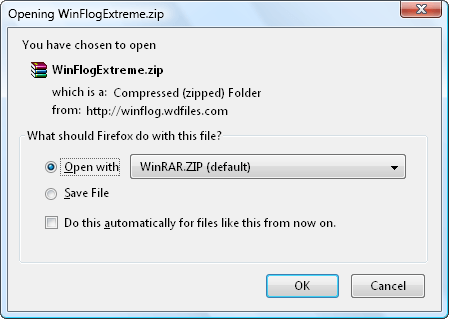
Select whether you want to open or save the zip file, and then click OK.
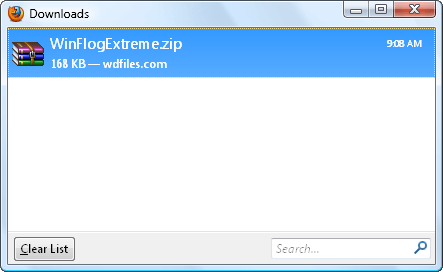
Wait for the download to finish.
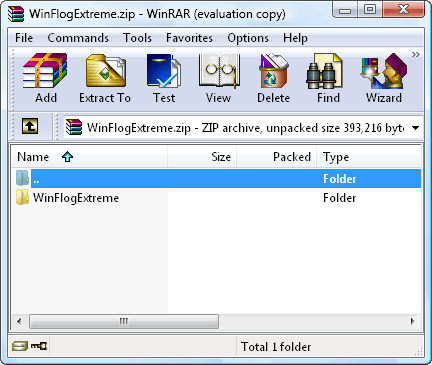
If you’ve opted to open the zip file, an archiver program will immediately open the file for you after the download is complete.
Extract or de-compress the zip file to your preferred computer directory.
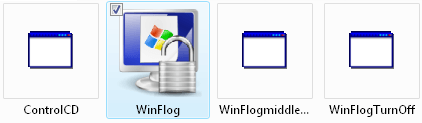
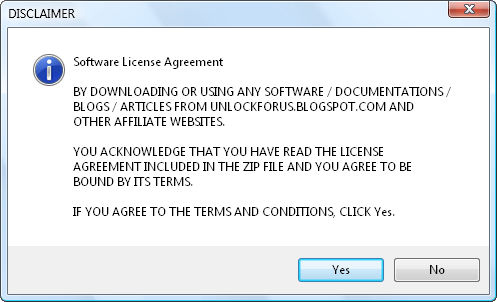
After extracting, open the WinFlog executable file (as shown below).
Click the Yes button to proceed to the next page.
This is the program’s primary interface. You can select your ideal language by clicking one of the language buttons.
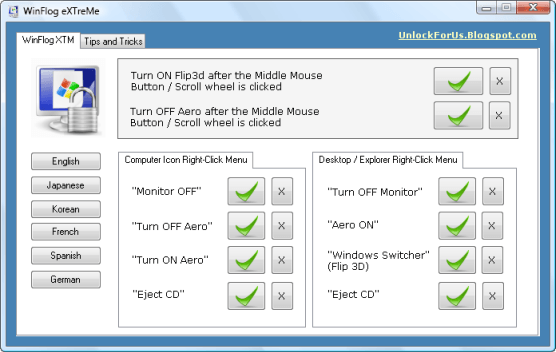
To use WinFlog’s tools, just press the buttons with the green check mark. As an example, we will click here the Monitor OFF check button.
This function, however, only works with Window XP. I will show you latter on how to turn off your monitor if you’re using Vista as your operating system.
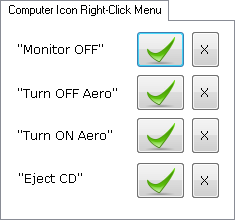
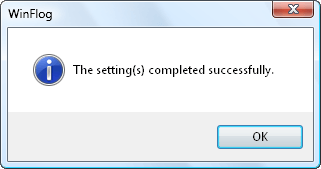
After pressing a button, the command is now set (for this instance, the turning-off command is now enabled).
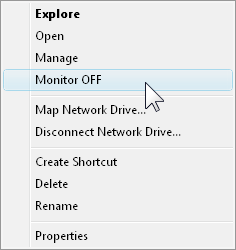
To turn-off a monitor, just right-click the My Computer icon and
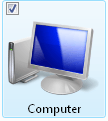
press Monitor OFF. This will instantly turn-off your laptop or desktop monitor. Aside from the My Computer icon, you can also apply the Monitor OFF command to your Desktop and Windows Explorer.
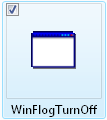
In Windows Vista, to turn-off a monitor, go to the location of the unzipped file and then double-click WinFlogTurnOff.exe (as shown below).
You can create a desktop, taskbar, and / or system tray shortcuts of this tool so that the turning-off of the monitor is just a click away.
Thanks and Regards !
14 January, 2011
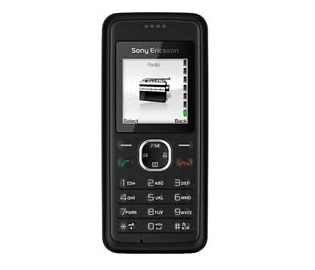
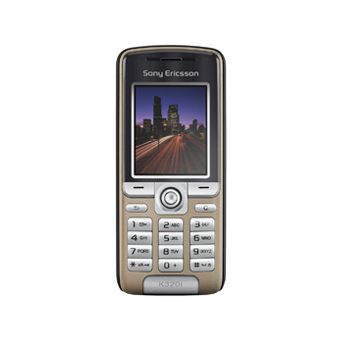
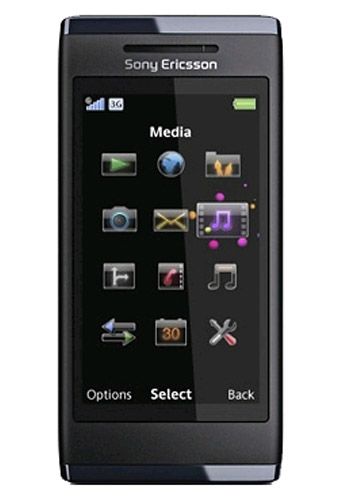
Here are the various model of Sony Ericsson Mobile and their market price in nepal. The authorised distributor of this mobile is FUTURE TECH TRADE Pvt. Ltd.
Tel: +97714233236, +9779801041501
E-mail: marketing@futuretechtrade.biz
All the price are according to the distributor and may be change with time.
These all mobile sets has 1 year warranty and 6 months warranty on battery.
These all mobile sets has 1 year warranty and 6 months warranty on battery.
| Model No. | Key Features | Market Price | ||
|---|---|---|---|---|
| 2.55" capacitive touchscreen, microSD up to 16GB, Phone Memory 128MB, 5MP Camera, Wi-Fi, Windows supported, FM radio with RDS, Video Streaming TrackIDTM, music recognition, Bluetooth TM stereo (A2DP), NeoReader barcode scanner, GSM/GPRS/EDGE 850/900/1800/1900 | Rs. 32,801/- | ||
| 16:9 nHD touchscreen (TFT), microSD upto 32GB, Phone Memory 70MB, 8MP Camera, Wi-Fi, Windows supported, Mp3/Wave/eAAC+/WMA, Mp4 player, TV Out, 3G, GSM/GPRS/EDGE 850/900/1800/1900 | Rs. 39,601/- | ||
| TFT resistive touchscreen, 65K colors, 256MB RAM, 512 MB ROM, microSD, 3G, Wi-Fi 802.11b/g,3.15 MP, 2048X1536 pixels, autofocus, MP3/AAC/MP4 player, Pocket Office | Rs. 35,000/- | ||
| TFT resistive touchscreen, 65K colors, 110MB storage, 256MB RAM, 512 MB ROM, microSD upto 16GB, 3G, Wi-Fi 802.11b/g, DLNA, 8MP, 3264X2448 pixels, MP4/Xvid/WMV9/H.263/H.264 player, TV out | Rs. 42,501/- | ||
| 3.2" 16M-color resistive touchscreen, 8 megapixel autofocus, HD 720p video recording @ 24fps, 720 MHz CPU, PowerVR SGX dedicated graphics accelerator, Wi-Fi and with GPS | Rs. 33,501/- | ||
| TFT, 256K colors, 10MB, Memory Stick Micro (M2), upto 4GB, 2 MP, 1600X1200 pixels, WAP 2.0/xHTML, HTML (Openwave), Walkman player, GSM 850/900/1800/1900 | Rs. 9,801/- | ||
| TFT, 256 colors, 32 MB, Memory Stick Micro (M2), upto 4GB, 3.15 MP, 2048X1536 pixels, Videocall camera, WAP 2.0/xHTML, HTML (NetFront 3.4), Walkman player 3.0, GSM 850/900/1800/1900 | Rs. 20,000/- | ||
| MicroSD upto 2GB media, phone memory 88MB, 8.1MP Camera, MP3, AAC, Pan & Zoom, TrackIDTM music recognition, BluetoothTM stereo (A2DP), Modem, MegaBassTM GSM/GPRS/EDGE | Rs. 30,000/- | ||
| TFT, 65K colors, 5MB, Memory Stick Micro (M2), upto 2GB, 1.3 MP, 1280X1024 pixels, Walkman media player, GSM 850/1900 -W205a, Stereo FM radio with RDS | Rs. 6,500/- | ||
| 262 TFT, 2.0 Megapixel Camera, Macromedia Flash Lite TM, Walkman 2.0 Music Player, 3G, Bluetooth, 16 Mbytes Memory Plus Memory Stick Micro TM, 3D Games, Tri Band Technology (GSM 900, GSM 1800 & GSM 1900) | Rs. 15,000/- | ||
| 2 Megapixel Camera, Digital Zoom - upto 4x, FM Radio, Screen 176X220 pixel, Memory 20MB, Memory Stick Micro TM Support | Rs.15,501/- | ||
| Speakerphone, Alarm Clock, SMS, Phone Book, Radio Screen: 96X64 pixel | Rs. 2,501/- | ||
| Predictive text input, Digital Zoom - upto 4x, FM Radio GSM 900/1800 | Rs. 2,000/- | ||
| 240X320 pixels, TFT, 256K colors, MicroSD upto 8GB, 2GB included, 100MB Phone Memory, 2MP Camera, 1600X1200 Pixels Camera, MP2/eAAC+/WMA Player MP4/WMV/H.263 | Rs. 10,000/- | ||
| 128X128 pixels Display, GSM 900/1800 MHz, 0.3MP 640X480 Camera, Charger, Handsfree, USB Cable | Rs. 3,000/- | ||
| Memory 160MB*, Memory Stick MicroTM Support upto 8GB, BluetoothTM Stereo (A2DP), 3D games, Handwriting recognition GSM/GPRS 900/1800/1900 | Rs. 15,000/- | ||
| Memory 160MB*, Memory Stick MicroTM support upto 8GB, Flash/ light type - Photo light, TrackID TM music recognition, BluetoothTM stereo (A2DP), Wi-Fi, GSM/GPRS 900/1800/1900 | Rs. 18,000/- | ||
| TFT, 16M colors, 319MB internal and microSD upto 16GB, Wi-Fi 802.11b/g, DLNA, 5MP Camera, MP3/eAAC+/WAV/MP4/H.263/H.264 player, GSM 850/900/1800/1900 | Rs. 20,701/- | ||
| VGA, 640X480 pixels camera, Standard Battery, Li-Po 900 mAh (BST-37), Browser WAP 1.2.1, Games3 embedded | Rs. 4,959/- | ||
| 128X160 pixels, UBC (Ultra Bright Color), VGA upto 4x Zoom, Bluetooth, Infra red port, GSM/GPRS 900/1800/1900 | Rs. 2,500/- | ||
| TFT, 65K colors, 10MB internal memory, 2G Network GSM 9../1800, Bluetooth, VGA, 640X480 pixels, video, Java MIDP 2.0, Torch functionality, MP3 player, FM radio. | Rs. 3,500/- | ||
| 2-inch TFT, 256K colors, 176X220 pixels, 15MB Internal Memory, Memory Stick Micro (M2) Card Slot upto 4GB, Bluetooth v2.0 with A2DP, MP3/MP4 player, 2 MP 1600X1200 pixels, LED flash | Rs. 7,500/- | ||
| TFT touchscreen, 16M colors, 128 MB Storage, 256 MB RAM, upto 32 GB, Wi-Fi 802.11b/g, DLNA, 12MP Camerea, 4000X3000 Pixels, Google Maps, MP4/H.264/H.263/WMV player, TV-out | Rs. 45,001/- | ||
| 240X320 pixels, 3.2 megapixels camera, 3G Network, Microsoft Office, MicroSD support, AAC, AAC+, AMR-NB, MIDI, MP3, WMA, WMV, A-GPS support | Rs. 28,882/- | ||
| 3MP Camera, A2DP, Bluetooth, Clamshell Form, Email Client, FM Radio, High-Speed Data GPRS, Memory Card Slot, MP3, Video Capture, Video Clip, 3G Network HSDPA 2100 | Rs. 15,601/- | ||
| TFT, 256K Colors, Memory Stick Micro (M2) - 20 MB internal Memory, 2MP, 1600X1200 pixels, flash, video, GSM 850/900/1800/1900, WAP 2.0/xHTML | Rs. 7,500/- | ||
| TFT, 256K colors, 12MB internal memory, Memory Stick Micro (M2), upto 2GB, 2MP, 1600X1200 pixels, MP3/AAC/AAC+/ eAAC+ players, T9, GSM 850/900/1800/1900 | Rs. 9,000/- | ||
| TFT, 65K colors, 5MB, 1.3MP, 1280X1024 pixels, Stereo AM/FM radio with RDS, MP3/AAC player | Rs. 4,000/- | ||
| Color TFT, 128X160 pixels, 10MB, 1.3 megapixels, GPRS, GSM, Bluetooth, MP3, Polyfone, FM radio, Java | Rs. 7,256/- | ||
| TFT, 16M colors, 90MB, MicroSD, upto 16GB, 3.15MP, 2048X1536 pixels, MP3/eAAC+/WMA players, MP4/WMV/H.263 player, 3G Network | Rs. 10,000/- | ||
| TFT, 128X160 pixels, 0.3MP camera 640 X 480, Polyphonic (32 Channels), GSM 900/1800 MHz | Rs. 3,000/- | ||
| 16:9 nHD touchscreen (TFT), microSD upto 16GB, Phone memory 55MB, 8.1MP Camera, Face detection, Tracker PlayStation3, Remote Play MP3, AAC, BluetoothTM Stereo (A2DP), Wi-Fi TM GSM/GPRS/EDGE 850/900/1800/1900 | Rs. 32,801/- | ||
| TFT, 256K colors, 20MB, Memory Stick Micro (M2), upto 4GB, 512MB Card, 2 MP, 1600X1200 pixels, Walkman Player, TrackID music recognition, GSM 850/900/1800/1900 | Rs. 9,000/- | ||
| TFT, 256K colors, 25MB, Memory Stick Micro (M2), upto 8GB, 3.15MP, 2048X1536 pixels, LED flash, Stereo FM radio with RDS, MP3/eAAC+/WMA/WMApro, MP4/WMV/H.263 player | Rs. 13,401/- | ||
| 60MB, Memory Stick Micro (M2), Upto 16GB, 5.0 megapixels, 8x Digital Zoom, GSM/3G-HSDPA/HSUPA, 2.4" TFT QVGA, 256K colors, 240X320 pixesl, GPRS/EDGE, 7.2 Mbps HSDPA, V.2.0 + A2DP | Rs. 13,000/- | ||
| TFT, 256K colors, 118 MB, Memory Stick Micro (M2), upto 16GB, 8.1MP, 3264X2448 pixels, autofocus, MP3/AAC/MP4 player, Kickstand, WAP 2.0/HTML (NetFront) | Rs. 27,501/- |










Subscribe to:
Posts (Atom)

