17 November, 2010

Boost up your ADSL Speed|Tweak ADSL speed

Posted by Unknown | 17 November, 2010 | Category: | 0 comments

ADSL is TCP/IP and TCP/IP is data based, each time a packet of data is sent, it must be acknowledged with an acknowledgment packet.This is the reason to slow down the system.You can increase the size of the window (TcpWindowSize) value on the end of the receiver to keep the sender from having to wait for every packet to be acknowledged before sending another one.Then,the sender can send packets until that value is reached before the receiver needs to send an acknowledgment.You should manually update the registery to tweak the TCP/IP parameters to boost .Just manually update your registry for increasing your ADSL speed 
1.Start regedit.exe. 
2.Go to HKEY_LOCAL_MACHINE\SYSTEM\CurrentControlSet\Services\Tcpip\Parameters. 
3.From the Edit menu, select New, DWORD value. 
4.Enter a name of TcpWindowSize, and press Enter. 
5.Double-click the new value, change the Base value to decimal, and enter a value of 32767. Click OK. 6.Close regedit. 
7.Reboot the machine. 
In step five,you can actually specify a higher value (up to 256000). However,on slow networks,this larger window size means that more data will need to be retransmitted.

04 October, 2010

Posted by Unknown | 04 October, 2010 | Category: , | 0 comments

Bandwidth Manager
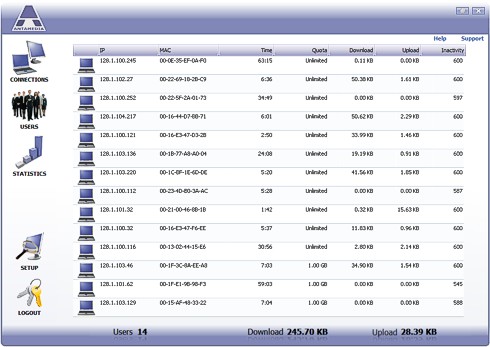
Bandwidth Manager helps you control download and upload rate for every computer in your network. Computers can be limited with specified time and quota per session, day time when access is allowed and set to logout after inactivity.

Bandwidth software for download limiting is very suitable for Internet and game cafes as it tightly integrates with Antamedia Internet cafe software enabling automatic blocking of traffic when user logout. Every user and computer can have different download and upload rates.


Download Bandwidth Manager    Order Bandwidth Manager
Bandwidth Manager Features
Windows Compatible - No Client Installation
Windows Compatible

Windows software with user-friendly interface. It doesn't require any proprietary hardware so you can use any standard PC with two network cards to setup bandwidth shaper.
Zero Client Administration

No client software installation is required.

Bandwidth Limit Control
Bandwidth Limit Control (Traffic Shaping Management)

A Bandwidth limit is configured in Kb/s for each account separately and represents speed a computer's Internet connection speed.

With Bandwidth Manager it's easy to set higher bandwidth for some of your computers and lower bandwidth for others. Controlling individual users bandwidth insures one customer can not interrupt the activity of another.

Bandwidth Quota Control (Traffic Quota Management)

A Bandwidth quota is configured in Mbytes for every account and represents the total amount of traffic available to a customer. Example: A customer can download 10 MB in one hour. This option can be disabled if you want to limit only the connection speed.

User Accounts Management
Accounts

There are 3 ways to grant Internet access to computers in your network:
Using Accounts that specify the IP or MAC of a computer. If an IP/MAC is found in the database, the computer is logged in and displayed in the listAutologin - If enabled, a computer is logged in with default options (download, upload, quota, time etc)Using Antamedia Internet Caffe Server to fully automate the login/logout process. As soon as Member, Timecode or postpaid session is started, Server will communicate with Bandwidth Manager and allow Internet access to the computer where the customer started their session. At the end of the session, access is blocked to the same computer, disabling any Internet traffic. This can reduce bandwidth if some online game has remained active or if viruses, spyware or trojans are consuming your bandwidth
Account Options
Download and Upload rate
Quota (total amount of data in MB available)
Unlimited quota (if you wish to limit only download/upload rate)Time left (If you wish to set limited time per session)
Unlimited time optionSet allowed access hours for loginAccount can be temporary disabled
Inactivity timeout (computer will be automatically logged out if there is no network activity within a specified time)

MAC Whitelist access control
MAC Whitelist 

Enables specified computers (identified by MAC address of network card) to pass-through the Bandwidth Manager. For example: allow your home computer to acquire access without any limitations

Reports and Activity Log
Activity Log

Bandwidth Manager stores different actions, including session start and stop, time of login attempts etc.Database is encoded and protected from unauthorized modifications

Employee Accounts Login
Login Password 
To access all software options, the administrator must enter a password. Staff will not be able to access and modify account details if not authorized

Softperfect bandwidth manager for Limiting the Bandwidth to the users

Posted by Unknown | | Category: , | 0 comments

Are your Internet costs rocketing? Is inappropriate use of your network having an adverse effect on your business-critical performance? Is Internet access bandwidth a major bottleneck in your network? If your network has any of these problems then SoftPerfect Bandwidth Manager will provide a cost effective solution. The software monitors your network traffic and limits bandwidth in whatever manner you specify. The result is an immediate increase in the efficiency of your network together with a reduction in your overall bandwidth requirements while allowing business-critical Internet applications to run at full speed.
SoftPerfect Bandwidth Manager is a full-featured traffic management tool for Windows that offers cost-effective bandwidth control and quality of service based on built-in prioritized rules. These rules can specify a bandwidth limit for each Internet user. This kind of software often called bandwidth shaper, bandwidth limiter or traffic shaper. With SoftPerfect Bandwidth Manager, you can apply speed-throttling rules to specified IP addresses, ports and even network interfaces with no changes to existing network infrastructure. The rich feature set of SoftPerfect Bandwidth Manager is easily managed via the intuitive Windows GUI.
The software requires Windows 2000 or higher and a network connection, which could be a wireless connection, or a modem that conforms to the NDIS standard.
There are two editions of SoftPerfect Bandwidth Manager available: standard and lite.

Key features

  • Centralized configuration from a single network location.
  • Flexible, prioritized, bidirectional rules to specify maximum data rates.
  • Rules for IP addresses, protocols, ports (for TCP/IP) and network interfaces.
  • Transparency for end users.
  • No software installation is required on client workstations in most cases.
  • Detailed and comprehensive statistics are available for each rule.
  • Quotas and penalties to discourage misuse.

Screenshots

The main window and quota manager. Click to enlarge!
Bandwidth Limiter Main WindowQuota Manager
Rule properties and statistics.
Bandwidth Limiter Rule CreationBandwidth Shaper Rule CreationBandwidth Dynamic AllocationBandwidth Shaper Rule Statistics
An installation example.
SoftPerfect Bandwidth Manager Installation Example

11 August, 2010

Microsoft vs. Google

Posted by Unknown | 11 August, 2010 | Category: , | 0 comments

The tension between these two software giants got a bit thicker this year, and it's certain that it will again in 2010. Here's a look at who is winning on each front in 2009.
1. IE8 vs. Google Chrome
Each version of Internet Explorer released is an opportunity for companies like Google to steal market share. Year was a very big year – and has given us an early glimpse into browser wars 2.0 that will surely play out over a few years.
Google Chrome had a great year – development versions are already on version 4.0. The browser is actually fast, unlike claims being made by Microsoft about IE8. In fact, most of the facts being given out by Microsoft about their new browser are completely false – an attempt to retain as much market share as possible.
Even though the numbers of users using IE8 are greater than those using Google Chrome, I'm giving this one to Google.
Winner: Google.
2. Operating system: Google Chrome OS vs. Windows
Not much of a fight here this year. Even though Google showed us their plans for Google Chrome OS, there is not much a threat here for Microsoft Windows.
Winner: Microsoft.
3. Operating System: Android vs. Windows Mobile 6.5
Microsoft has really been falling behind on the mobile front. Instead of releasing Windows Mobile 7, all they could do was give us 6.5 – a relatively small improvement over 6. In the same breath, Google's Android operating system has found its way onto a handful of devices, and has had 2 major versions released in just one year.
2010 should hopefully be a more competitive year on this front, but this year has to go to Google.
Winner: Google.
4. Search Engine: Google Search vs. Bing
I have been surprised so far with Bing actually – it's been doing better than I had originally thought it would – though I still don't believe Google has anything to worry about.
Both search engines gained market share this year: Google (+2.3%) and Bing (+0.1%) according to Net Applications as of November.
Both search engines struck deals with Twitter to gain access to their firehose. Real-time search has been added to Google in their main index, and Bing has added a separate tool that you can use to search throuht tweets.
Due to Google's increased dominant position, and their superior feature created as part of their foray into real-time search has earned Google the gold star for this one.
Winner: Google
5. The Enterprise
Microsoft is fighting to keep their enterprises clients from Google Apps, while Google is looking to steal any type of markets share by offering cheaper licensing fees and lower overall costs.
About the same time Google announced their (impressive) numbers around Google Apps, Microsoft decided to drop their licensing fees. There's no word on whether the price cut has anything to do with any pressure that may be coming from Google, but there's no question – its game on.
Even though Google reported impressive numbers (2 million businesses and 20 million users), there's no word on how many of those are using Google Apps exclusively, and how many of those are paid. The Google Apps standard edition is free – but lets companies only create a limited number of accounts, and doesn't include some of the features of "premium".
There is no way Google won the enterprise battle this year – through it's unlikely they will give up for 2010.
Winner: Microsoft.

Cool Windows 7 features

Posted by Unknown | | Category: | 0 comments

1. Shake 'em away
Ever had 10 Notepad, two PowerPoint and 50 Outlook windows open? Want to minimize all of them except the most important one? In Windows 7, you can grab the topof the window and shake it about to scare away all of the other open windows. Simple.
2. Jumplists
Jumplists are a new feature that gives you the option to view a list of recently accessed files by application, even when the application isn't open, by right clicking on the application's icon in the taskbar. It also allows you to quickly access a favourite playlist without opening your media player. Jumplists can also be found integrated into the Start Menu.
3. A step forward in previewing
In Vista, hovering over a minimized window on the taskbar would provide a preview of the window. In Window 7, a similar preview pops up which also gibes the option to close a window (within the preview), along with a full-size 'peek'. You can also press Win + T to scroll along previews in the taskbar.
4. Snap into place
Simply drag your window to the left or right edge of the desktop to snap and resize the window to one half of the screen. Drag the window to the top to maximize it. A pretty neat idea made neater by the use of the keyboard shortcuts (Win + respective arrow keys). No longer do you have to frustratingly position the mouse at the edge of the window to resize it.
5. XP Mode
This time, you do not have to slap your head that same way when Vista would not run an XP application. For the XP applications that do not work under Windows 7, you can download XP Mode free from the Microsoft website and run XP applications in an emulated XP environment in Windows 7. Imagine Parallels on Mac OS X without the need to fish out money on an extra OS.
6. An easier and quicker way to adjust multiple displays
Do you constantly connect your computer to different external monitors or projectors, especially at work? Try Win + P, and duplicating or extending your display to the other monitor takes just a second. Win + P present you with an Alt + Tab style menu, which is idea if you give a lot of presentations at work on your laptop.
7. A personalized Stage for your device
With the new 'Device and Printers' button on the Start Menu, devices which are connected to your computer can have their own Stage. This Device Stage presents supported devices with a photo-realistic render and a link to the vendor's website, along with other updates and useful information (such as firmware updates and manuals).
8. (Almost) eliminate the notification area!
What, I can even get rid of the clock and volume icons? Yes. Click the arrow that fives access to the overflow icons in the notification area and click 'customize'. Select each icon and click 'hide icon and notifications' to remove it. Clean.

04 August, 2010

BlackBerry Torch 9800 with BlackBerry 6 OS on AT&T

Posted by Unknown | 04 August, 2010 | Category: , | 0 comments

AT&T and Research In Motion (RIM) have officially announced the launch of latest high-performance BlackBerry Torch 9800 smartphone. It’s the cool touch-enabled slider phone which RIM promises to bring a number of new experience for BlackBerry enthusiasts – first BlackBerry smartphone featured with new highly-anticipated BlackBerry 6 OS, first to combine a full touchscreen with BlackBerry QWERTY keyboard, first to support AT&T’s next-generation messaging capabilities, first to get BlackBerry App World pre-installed, first to support AT&T’s new Locations feature, and more.


BlackBerry Torch 9800

“This is one of the most significant launches in RIM’s history and we are proud to introduce the new BlackBerry Torch and BlackBerry 6 together with AT&T,” commented Mike Lazaridis, president and co-ceo for RIM. “With a new user interface, new browser and new handset design, the highly anticipated BlackBerry Torch and BlackBerry 6 deliver integrated and uncompromising capabilities for consumers and business professionals that preserve the industry-leading strengths of the BlackBerry platform while adding exciting new dimensions.”

Key Features Of BlackBerry Torch 9800 (AT&T):
  • 3.2-inch HVGA+ (480×360 pixels) touchscreen display
  • Slide-out full QWERTY keyboard plus optical trackpad
  • 5 megapixel camera with continuous auto focus, flash, image stabilization, scene modes and geo-tagging capability
  • Universal search lets users scan through email, messages, contacts, multimedia contents apps and even Internet – all in 1 search from the home screen
  • Social networking and RSS feeds (Social Feeds) for 1 view of all your favorite sites like Facebook, Twitter and MySpace
  • Enhanced browsing experience (WebKit-based browser) with pinch-to-zoom capability and tabs for accessing multiple sites at once
  • New Text Messages app supports AT&T’s next-generation messaging experience including group messaging for up to ten people and locations
  • Pre-loaded with a basket of cool applications including CNN, The Weather Channel, Fandango, Bloomberg, ESPN, YPmobile, Web Video Search and Slacker Radio Plus
  • New Locations function for easy searching points of interest, businesses and even your own location
  • 4GB internal memory plus microSD memory expansion slot (up to 32GB)
  • Integrated GPS, Bluetooth 2.1 and Wi-Fi 802.11 b/g/n connectivity
  • Talk time: up to 5.5 hours ; Standby time: up to 18 days
  • Dimensions: 111 x 62 x 14.6 mm ; Weight: 5.68 ounces
The new sleek, stylish smartphone that comes bundled with a 4GB microSD memory card will be exclusively available to AT&T customers beginning August 12 for $199.99 with a new 2-year contract.
Watch the Intro video for latest BlackBerry 6 platform and BlackBerry Torch 9808:

How Bing is out-innovating Google

Posted by Unknown | | Category: | 0 comments

Editor's note: Business Insider is contributing a series of columns to CNN.com that challenge commonly held beliefs about the tech world.
Google is one of the smartest, most innovative companies in the world, but in its core business -- online search -- it's being routinely shown up by Microsoft's third-place search engine, Bing.
Bing is a surprisingly fast-moving, innovative product -- and it's forcing Google to play catch-up time and time again.
Years ago, for example, Google set itself apart from other search engines by focusing on making its homepage load faster than everyone else's, including a very simple design with a white background.
Then, last year, Microsoft launched Bing with a colorful, photography-driven design.
When Bing's look became popular, Google launched a feature to enable its users to make Google look colorful like that, too. For a day, Google even replaced its default background with an image, mimicking Bing's look. Google users were not impressed with the decision, however. They howled, and Google quickly reverted back to the plain white look.
The decision to change its layout and then to undo the change shows that Google is feeling the pressure of Microsoft going hard into the search space.
And this wasn't the first time Google's hand was forced by Microsoft. In October, Microsoft announced at an industry conference that it was integrating Twitter results into Bing. Google was upstaged, since it hadn't announced a Twitter deal yet. The company scrambled to get Twitter integration, which it announced just hours later. The move looked desperate.
Google has also borrowed Bing's look on its search results pages.
When Bing launched, it tried pursuing search from a different angle than Google. Industry observer John Battelle wrote that Microsoft was trying to help "people make decisions in a new way." It was doing this by breaking up search results into categories. Instead of getting just 10 blue links like Google offered, you get subheadings for each result.
So, type in "Friday Night Lights," for instance, and you get "News," general results, videos, then "cast," then "episodes." At first, it's a bit jarring, but it can be useful by breaking up search results into what you need. Just over a year after Bing debuted, Battelle noted that Google was changing its design to follow the search design Bing was using.
For all of Bing's new ideas, it hasn't translated into big gains in users. The latest numbers from comScore show that 63 percent of searches in the U.S. are performed on Google, but just 13 percent are done on Bing.
Thanks to that huge share of search, Google has built a wildly profitable business. Meanwhile, Microsoft is losing billions online, dumping money into Bing and other properties.
So, while Microsoft gets credit for innovating and forcing Google's hand, it's not paying off.
The opinions expressed in this commentary are solely those of Jay Yarow.

hit counters